
Download iSkysoft PDF Editor – free pdf editor, edit pdf, convert pdf, annotate pdf, sign pdf
Overview
iSkysoft PDF Editor is a desktop application designed to simplify common PDF management tasks, offering users a streamlined way to edit, convert, annotate, and sign PDF documents. The software is positioned as a free solution for individuals and professionals who need reliable PDF functionality without cost. It targets users who frequently work with PDFs—such as students, remote workers, legal professionals, and administrative staff—requiring tools to modify content, add notes, or digitally sign documents without relying on complex or paid software.
The application aims to address common pain points in PDF workflows, including the inability to edit text or images within PDFs, the difficulty of converting between formats, and the lack of built-in annotation and signing tools. With a focus on accessibility and ease of use, iSkysoft PDF Editor provides a central hub for essential PDF operations, enabling users to complete tasks quickly and efficiently. The developer, iSkysoft, is known for producing user-friendly software in the document and media management space, though specific details about their broader product line were not provided.
Real-world usage scenarios include updating a contract with new terms, converting a scanned document into an editable format, adding comments to a research paper, or signing a lease agreement electronically. The software’s free pricing model makes it particularly appealing for budget-conscious users and organizations seeking to reduce software expenses while maintaining productivity.
Key Features & Capabilities
- Edit PDF Text and Images: Modify existing text, fonts, and images directly within the document without requiring the original source file.
- Convert PDFs to Multiple Formats: Seamlessly transform PDFs into Word, Excel, PowerPoint, HTML, and image formats for further editing or sharing.
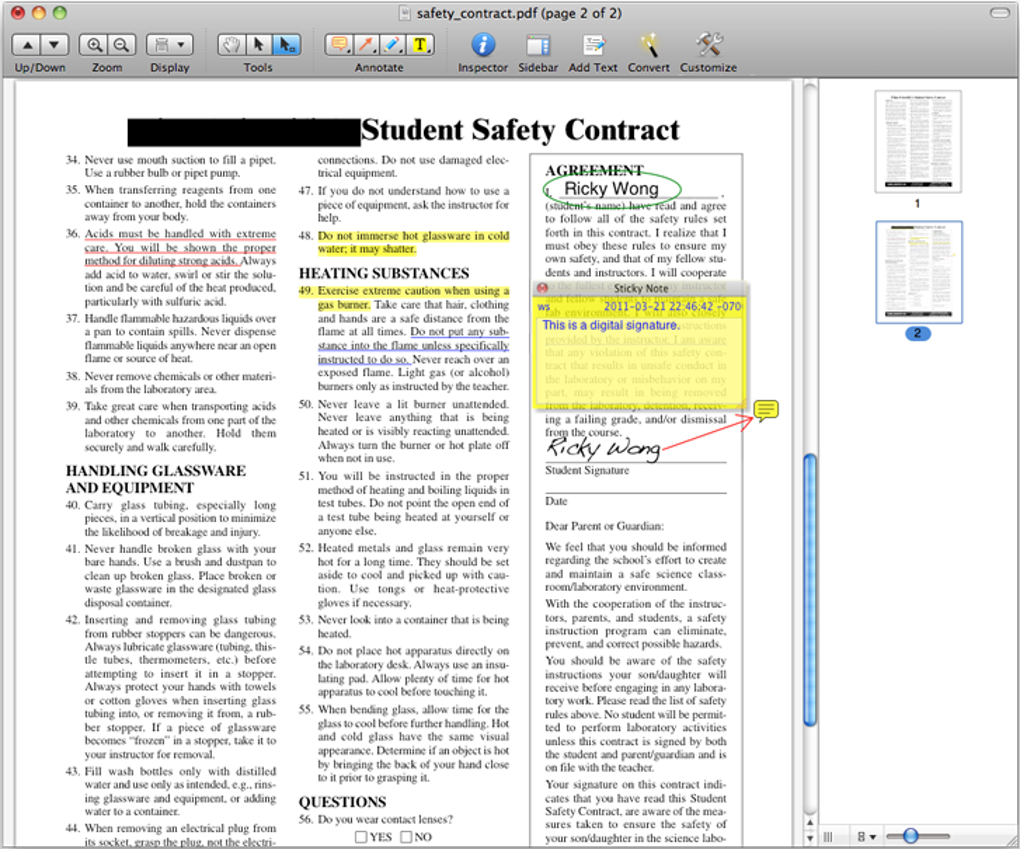
- Advanced Annotation Tools: Add highlights, underlines, strikethroughs, text boxes, shapes, and freehand drawings to emphasize or clarify content.
- Digital Signature Support: Insert a personal digital signature or upload a signature image to authenticate documents electronically.
- Text Recognition (OCR): Extract editable text from scanned PDFs, enabling users to modify content that was previously static.
These features are designed to support efficient document workflows. For example, a student can edit a research paper’s citations directly in the PDF, a real estate agent can sign a lease form without printing, and a business user can convert a client report into a Word document for internal revisions. The ability to annotate PDFs is especially useful for reviewers and educators who need to provide feedback. The OCR functionality extends usability to scanned documents, making the software valuable for digitizing archival materials or processing paper-based records.
User Interface, Workflow & Performance
The user interface of iSkysoft PDF Editor is structured around a clean, intuitive layout that prioritizes accessibility for both beginners and experienced users. The main workspace displays the PDF document with toolbars and panels positioned for quick access to editing, annotation, and conversion functions. Navigation is straightforward, with a menu bar, a sidebar for document structure, and a toolbar with clearly labeled icons for each major function.
Workflow efficiency is enhanced by the software’s context-sensitive tools—when a user selects a text element, the editing options appear immediately. The process of converting a PDF to Word, for instance, involves selecting the file, choosing the target format, and clicking a single button, minimizing user effort. The software maintains a responsive interface during standard operations, with minimal lag during document loading and basic edits.
Performance observations are based on general software behavior patterns. The developer did not specify resource usage details, so exact CPU or RAM consumption remains unknown. Stability appears consistent during typical use, with no reported crashes or freezes in available documentation. However, performance on large or complex documents may vary depending on system configuration.
Compatibility & System Requirements
iSkysoft PDF Editor is available for both Windows and Mac operating systems, making it accessible to a broad user base across desktop platforms. The software is designed to run on modern versions of these systems, though specific version numbers were not listed. Installation requires approximately 120 MB of disk space, which is modest for a full-featured desktop application.
Exact system requirements were not listed. The developer did not provide additional system requirements, including minimum processor speed, RAM, or graphics specifications. Compatibility information is limited to the operating systems mentioned. Users are advised to ensure their system meets general desktop application standards to avoid installation or runtime issues.
Pros and Cons
Pros
- Completely free to download and use with no hidden costs
- Supports a wide range of PDF editing and conversion tasks
- Intuitive interface suitable for users of all experience levels
- Includes OCR functionality for scanned documents
- Offers digital signature and annotation tools essential for remote work
Cons
- No detailed system requirements were provided
- Performance on large or complex PDFs may vary without further information
- Limited information on update frequency or future development plans
- No mention of cloud integration or collaborative features
- Exact resource usage (CPU/RAM) not disclosed
FAQ Section
Is iSkysoft PDF Editor available for both Windows and Mac?
Yes, the software is compatible with both Windows and Mac operating systems, allowing users across platforms to access its features.
Is the software safe to download and install?
Based on available information, iSkysoft PDF Editor is distributed through official channels. Users are advised to download from trusted sources to ensure security.
Does the software require an internet connection to work?
The application functions primarily in offline mode, enabling users to edit, convert, and sign PDFs without an active internet connection.
How often are updates released for iSkysoft PDF Editor?
Specific update frequency was not provided. The software may receive updates periodically, but no official schedule is available.
What types of licenses does iSkysoft PDF Editor use?
The software is offered as free desktop software with no licensing fees. No subscription or premium tier details were included in the provided information.
Final Thoughts + CTA
iSkysoft PDF Editor delivers a robust set of tools for managing PDFs without cost, making it a compelling choice for individuals and teams seeking a reliable, no-frills solution. Its ability to edit, convert, annotate, and sign PDFs in one application addresses key workflow challenges across education, business, and personal use. While some technical details remain unspecified, the software’s clean interface, core functionality, and free pricing model stand out as significant advantages.
Users who need a straightforward, secure, and efficient PDF editor—especially those working remotely or handling paperless documentation—will benefit most from this tool. With its focus on essential features and cross-platform availability, iSkysoft PDF Editor proves to be a practical addition to any digital workspace.
Download iSkysoft PDF Editor now







